
3 Cowork Updates That Finally Make Claude Work for Any Small Business Team
Windows support, overnight routines, and 15 pre-built workflows — the on-ramp just got a lot wider.


Back in April I wrote that Cowork had gone from “not for me” to genuinely useful. Three capability releases in, it had become the on-ramp I’d been waiting for. CLI for code and dev work; Cowork for knowledge work and non-technical team members.
That framing held. What’s changed since then is that Anthropic shipped a lot more product underneath it.
Here’s what’s new, what it means for a small team, and why the combination of these releases is more interesting than any one of them alone.
What Actually Shipped Since April
Cowork is generally available on Windows. The April article was honest that the newest Cowork features were macOS-only at the time. That’s gone. Cowork exited research preview on April 9 with full GA on both macOS and Windows, plus Microsoft 365 connectivity: Outlook, OneDrive, SharePoint, and Teams all native. A 5-person professional services firm running Windows machines and Microsoft 365 can now run Cowork with the full feature set, out of the box.
Routines run while your laptop is closed. This is the material one. There’s an important distinction worth spelling out clearly:
Scheduled Tasks run on your desktop machine. Your laptop must be on and Claude must be running.
Routines run on Anthropic-managed cloud infrastructure. They run whether your laptop is open, closed, or off.
Routines package a prompt plus one or more repositories or connectors into a reusable automation triggered by schedule, API call, or GitHub webhook. The use-case framing I’ve seen that captures it best: “The morning brief stays on Scheduled Tasks because it’s tied to when I sit down at my desk. The ‘alert the team if a critical ticket sits idle for four hours’ workflow moves to Routines because it has to fire whether or not anyone’s awake.”
That’s the difference between an AI assistant and an AI employee. The employee doesn’t go off the clock when you close the lid.
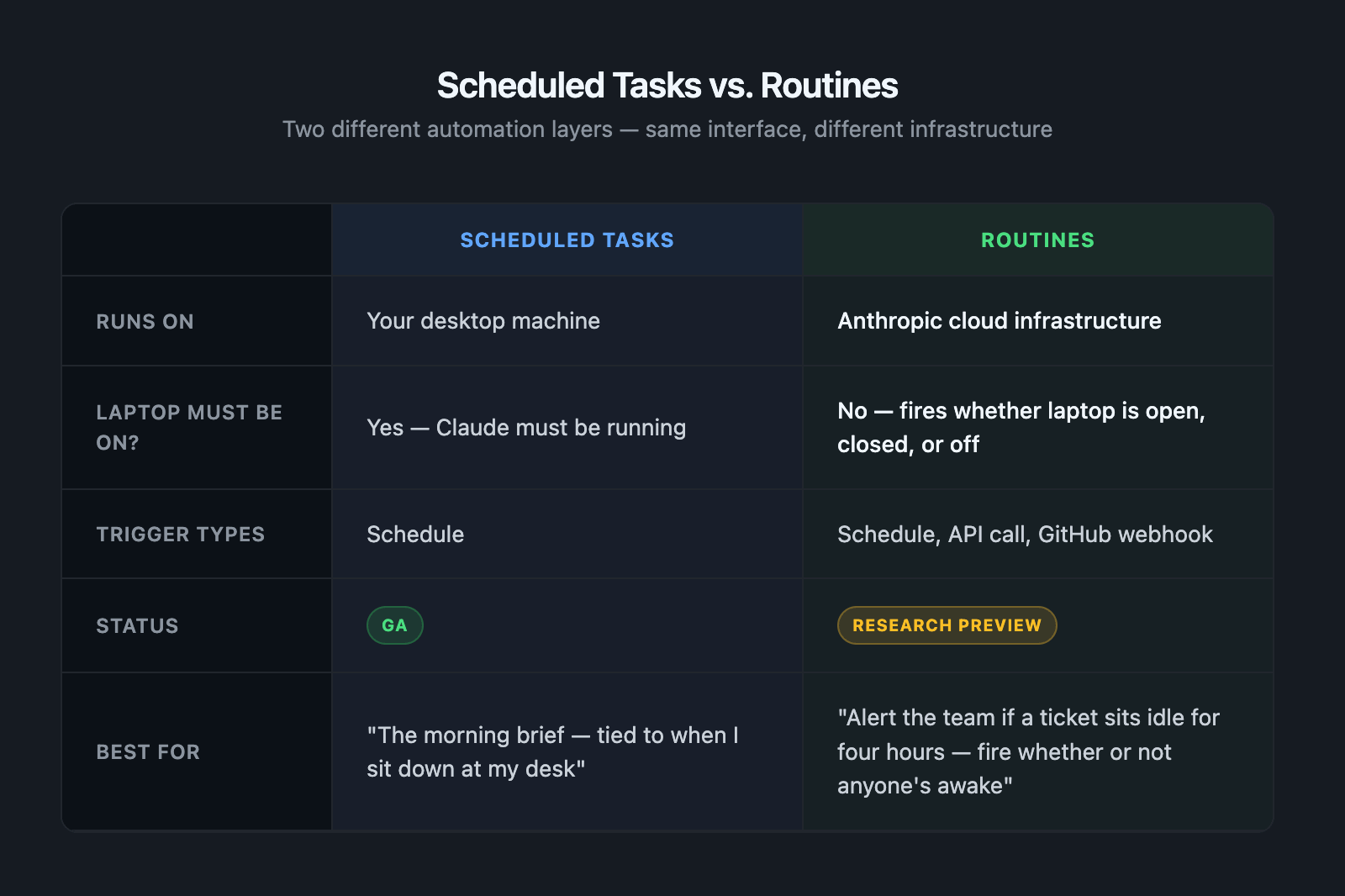
Routines launched in research preview April 14 and remain in research preview as of June 2026. The direction is clear and it’s worth planning around.
Anthropic built 15 workflows for the tools you already pay for. Claude for Small Business launched May 13. It is not a new pricing tier. It’s a workflow and connector package layered on top of existing Claude plans, a “toggle install” that puts Claude to work inside tools small businesses already use.
Fifteen pre-built workflows across finance, operations, sales, marketing, HR, and customer service. Named connectors at launch: QuickBooks, PayPal, HubSpot, Canva, DocuSign, Google Workspace, Microsoft 365, Slack, Square, Stripe, Webflow.
The model: you initiate each workflow, review the plan, sign off before anything is sent, posted, or paid. Human in the loop by default. No terminal. No configuration overhead.
No extra charge beyond your existing subscriptions.
Why These Three Things Together Are the Story
Each of these is a solid individual release. But the combination is worth naming explicitly.
Cowork is the delivery mechanism. Small Business Config is the payload. The 15 pre-built workflows run inside Cowork’s interface and connect to named tools through Cowork’s connector layer. These aren’t separate products. They’re the same product, layered. When you install Claude for Small Business, you’re using Cowork.
The Windows GA closes the last friction point from April. Every team can now access the full feature set. There’s no longer a reason to defer Cowork adoption based on OS or stack.
Routines change the “overnight” story. Scheduled Tasks was already a significant upgrade over the CLI’s /loop for non-technical users: no terminal required, survives restarts. Routines extend that to full infrastructure independence. For a founder who isn’t a developer, this matters more than any individual workflow.
The April article ended: “Cowork is your entry point now. The concepts transfer directly when you’re ready for more.”
That entry point now has pre-built workflows, named integrations, free training workshops, and a 10-city tour. The thesis got a product.
How to Actually Start
If you’re running a 1-10 person company and you’ve been watching this space but haven’t moved yet, here’s the right order:
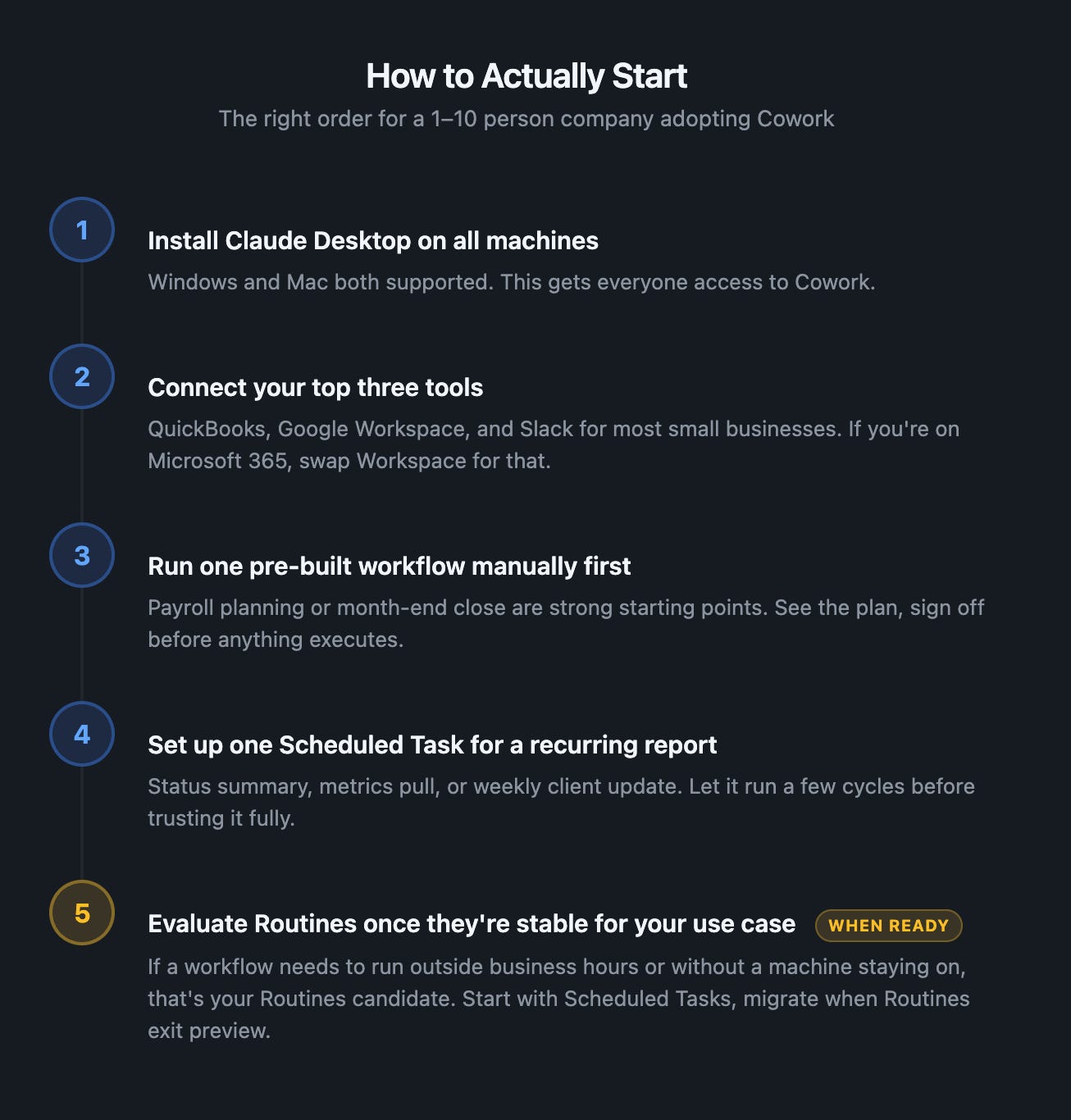
1. Install Claude Desktop on all machines. Windows and Mac both work now. This gets everyone access to Cowork.
2. Connect your top three tools. QuickBooks, Google Workspace, and Slack are the high-probability choices for most small businesses. If you’re Microsoft 365, swap Workspace for that.
3. Run one pre-built workflow manually first. Payroll planning or month-end close are good starting points for finance ops. These are high-value tasks where seeing Claude draft the plan and waiting for your sign-off is the right dynamic.
4. Set up one Scheduled Task for a recurring report. Find something you currently do manually every week: a status summary, a metrics pull, a client update. Set it as a Scheduled Task and let it run a few cycles before you trust it fully.
5. Evaluate Routines once they’re stable for your use case. If you have a workflow that needs to run outside business hours or without a machine staying on, that’s your Routines candidate. Start with the Scheduled Tasks version, then migrate when Routines are out of preview.
The goal isn’t to automate everything at once. It’s to pick one workflow, run it until it’s boring, then pick the next one.
If you have team members who found the CLI too steep: this was always the Cowork argument, and it’s now stronger. Non-technical members can access the same primitives through a UI with pre-built workflows they don’t need to prompt-engineer from scratch.
If your biggest AI complaint is “it stops working when I close my laptop”: that’s what Routines solve.
If you’ve been waiting for the tool to feel finished: it’s not finished. It’s actively shipping. But the foundation is solid enough to build real workflows on. The rough edges in April were real. Most of them are gone.
The on-ramp is wider now. Pick your entry point and start moving.
Launched Claude for Small Business on your team? Working through the setup? Leave a comment below. I’m tracking what’s actually working and what isn’t, and I’ll follow up with specifics.
Want the tactical breakdown delivered? Subscribe to get it.